How to Sell eLoad Products via SMS
 February 1st, 2011 |
  Author:
 1. LoadCentral Retailer types the Product Code that the buyer (end-user) chose and paid for. Then send the text message to any of the LoadCentral’s Access Number. Kindly note that selling eload products via SMS is just like sending a regular text message to someone. So regular text message fees apply. The retailer’s SIM card need to have a personal load to be able to send the code to the access numbers. Retailers are recommended to subscribe to UNLITEXT promos or use the webtool instead.
< PRODUCT CODE > <6-DIGIT PASSWORD> < MOBILE # OF BUYER >
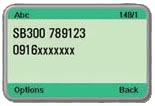
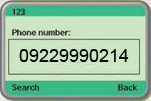
2. Retailer and Buyer get a confirmation message from LoadCentral.
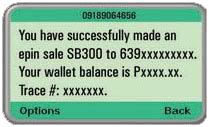
Message to Retailer:
You have succesfully made an e-pin sale (Product Code) to (Mobile number of buyer). Your wallet balance is Pxxxx.xx. Trace #: xxxxxxx
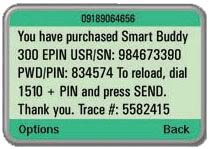
Message to Buyer:
You have purchased (Product Code) (PIN). Thank you for using our service. Trace #: xxxxxxx
Was this post helpful? Rate it!
 (25 votes, average: 4.52 out of 5)
 Loading...
 Posted in
  Tags:
Tags: