Posts Tagged ‘epin’
How to buy load using Bitcoin or CryptoCurrency
 May 18th, 2018 |
  Author:
 Please follow these simple steps when buying eload or epin anonymously and securely using Bitcoin (BTC), Bitcoin Cash (BCH), Litecoin (LTC), Ethereum (ETH) or Dash (DASH). Coins.ph is also accepted for peso payments.
How to buy load on www.loadcentral.ph in 10 simple steps:
Step 1: Choose appropriate “Category”.
Step 2: Choose from “Products” list.
Step 3: Enter the mobile number where the load will be sent.
Step 4: Click the “Add Item” button. Repeat steps 1-4 if you want to buy more products.
Step 5: Click “Check Cart” button to review the list of products you are buying.
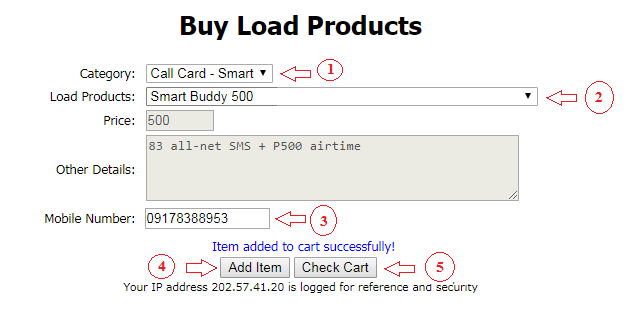
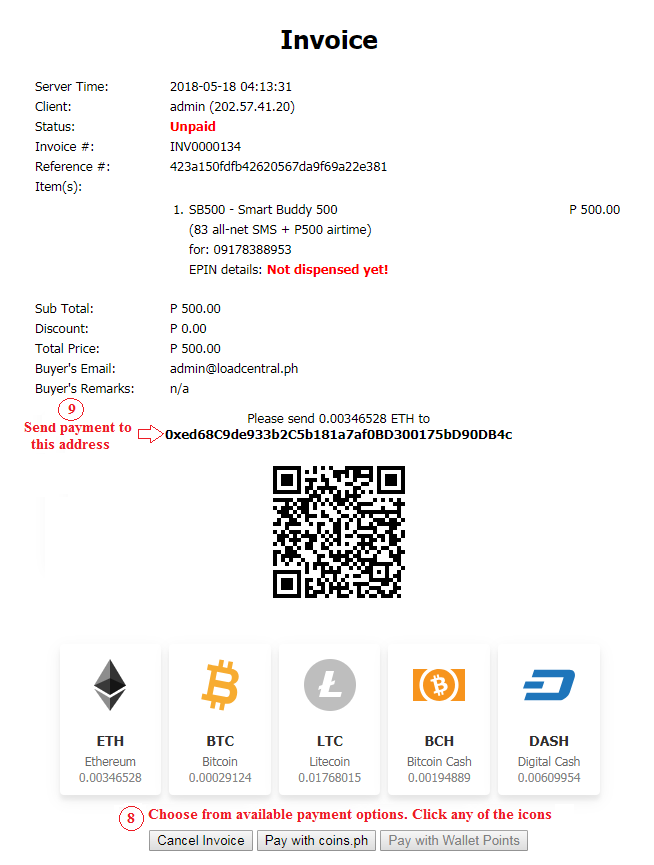
Step 6: Enter your email address on the “Cart” page. All details of your order will be sent here. So, make sure to enter valid email address only. Apply your promo code if you have one.
Step 7: Click “Proceed Checkout” button to see your final invoice.
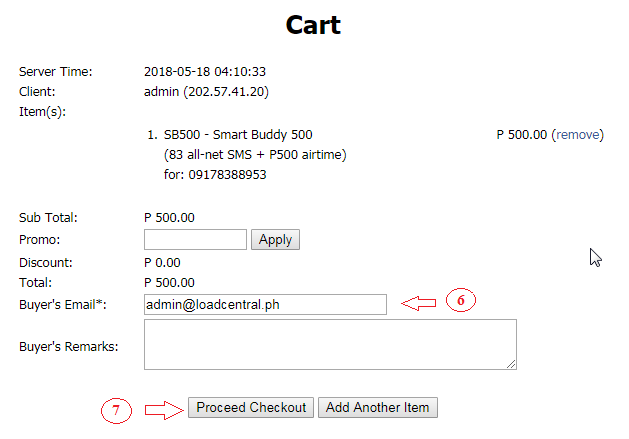
Step 8: Choose from available payment options displayed on the page. Click any of the icons to pay using cryptocurrency.
Step 9: Send your payment to the crypto address generated. Send the exact amount indicated on the invoice excluding transaction fees. If you’ll choose coins.ph, you will be redirected to coins.ph’s payment page.
Step 10: Wait for your payment to be confirmed on the blockchain. Once payment is confirmed, your order will be processed instantly. The load will be sent to your mobile number entered on Step 3. The details of your invoice will be sent to the email address entered on Step 6.
Buying load has not been this easy!
About www.loadcentral.ph: This 1-stop shop is an official partner of Uniwiz Trade Sales, Inc., the owner and developer of the LoadCentral platform that sells all kinds of load and prepaid products in the Philippines.
Was this post helpful? Rate it! (8 votes, average: 5.00 out of 5)
 Loading...
 Posted in Uncategorized |
  Tags: BCH, Bitcoin, Bitcoin Cash, BTC, coins.ph, Dash, eload, epin, ETH, Ethereum, Litecoin, loadcentral tips, LTC |
  1 Comment »
Frequently Asked Questions
LoadCentral Dealership / Retailership Program:
What is LoadCentral?
LoadCentral is a centralized distribution/reloading system which allows retailers to sell Globe and Smart electronic load (E-Load) and electronic PINs (E-PIN) of various prepaid card products to customers through a cellphone or webtool.
Who uses LoadCentral?
There is Netopia, the most popular retailer of LoadCentral. If you’re an online gamer, most likely you have already bought a load from LoadCentral through a Netopia branch. Other establishments like Flying V and Copy Unlimited have LoadCentral for their loading station. Internet cafes in various parts of Metro Manila are starting to adopt the LoadCentral loading system.
Can I use LoadCentral for my personal prepaid needs?
Yes. In fact, I highly encourage prepaid consumers like online gamers and prepaid cellphone users to use LoadCentral so you can avail of your favorite prepaid products at a discounted price!
Will the LoadCentral Dealer issue or sell a Retailer SIM?
No. Any mobile number (Smart, Talk N’ Text, Globe, Touch Mobile, Sun) can be registered by a LoadCentral Dealer as a LoadCentral retailer number.
Can the same retailer number be registered to two or more dealers?
No. A sim card can only be registered once in the LoadCentral system.
Can a retailer register another retailer?
No. Only LoadCentral office, a Dealer or Sub-Dealer can register a sim to become a Retailer.
When can a retailer start selling the LoadCentral way?
A retailer can start selling the LoadCentral way after the LoadCentral dealer registered your mobile number and after you replenish your load wallet.
How to Sell Loadcentral Products?
Retailers can sell eloads through a.) SMS by using keywords then sending it to a LoadCentral Access Number; and/or b.) thru the internet using the WebTool.
What are the LoadCentral Access Numbers (LCANs)?
Click here to view available LoadCentral Access Numbers for SMS requests. If your registered mobile phone number is a Globe/TouchMobile sim, I suggest you use the Globe LCAN to take advantage of your free text credits.
How will I know about the discounts given by LoadCentral?
Check the latest post update. LoadCentral Discount Structure can be downloaded in the Download Materials section.
What happens if my retailer SIM and/or mobile phone are lost or stolen? What happens to my remaining wallet load?
You must immediately notify your dealer so she can deactivate or block your mobile number. You must then ask your dealer to register another mobile number as your new retailer SIM. Your dealer will then inform LoadCentral by a written notice (fax or email) and request that the remaining balance in your old registered number be transferred to your new one.
What are FL and SL passwords?
FL password means First Level Password. While SL password means Secondary Level Password.
How are FL and SL passwords used?
The usage of FL and SL passwords depends on the type of your LoadCentral account.
For Retailers:
FL – First Level password (SMS / Android app password) – can be changed via SMS only. This is used on all SMS-related transactions.
SL – Secondary Level password (webtool password) – can be changed via webtool only.
For Dealers & Sub-Dealers:
FL – First Level password (SMS / Android app / webtool password) – can be changed via SMS or webtool. This is used on all SMS-related transactions.
SL – Secondary Level password (needed during Retailer registration and walletload replenishment) – can be changed via webtool only.
What happens if I forgot my password?
We do not have password recovery tool. There is no way for us or even main office to retrieve your passwords because they are encrypted in the system. The only option is to send RESET SL/FL to hotline number +639285067310. Here is the procedure to reset your SMS or Webtool password:
1. Use the LoadCentral registered sim number
2. On the mobile phone go to “Write Message”, Type RESET (SPACE) LEVEL-OF-PASSWORD
Ex.: RESET FL or RESET SL
3. send to LC Texthotline number +639285067310
Note:
- You can only change your password from Monday to Sunday: 9:00AM – 6:00PM
- Resetting of FL and SL passwords are independent on each other.
- You have to change the default password 123456 and make sure that the FL and SL passwords are not the same to avoid being locked
How can I get a transaction report?
You can use the webtool for the transaction report or you can ask your dealer for a copy of your transactions.
How to change my password?
To change your password: create a new message on your LoadCentral registered mobile phone, type CHANGEPW [old 6-digit password] [new 6-digit password] then send to our official LoadCentral Access Number (LCAN)
What to do if I receive an Invalid password supplied error when logging in to the webtool?
Please make sure that you entered your 6-digit password which you assigned when you confirmed your registration.
What to do if I receive a “User XXXXX not found” error when logging in to the webtool?
Please make sure that you used the 639xxxx format of your mobile number for your webtool username.
What should I do if the buyer does not receive the product electronic PIN (E-PIN) with his mobile?
You can use the resend function on the webtool. Please be aware that you can only resend the last transaction for your buyer’s mobile number.
Can you restrict the IP address where I can access the webtool?
Yes. Currently, all retailers are set to access the webtool from any IP Address (Dynamic). If you wish additional security access, we can restrict your access to the webtool from a particular IP Address (Static).
Why is my account always blocked?
Our system automatically locks the webtool of LoadCentral accounts that were not changed for a while. To unlock your account: create a new message on your LoadCentral registered mobile phone, type UNLOCK (space) password then send to our official Access Numbers. You must also have different passwords for your SMS and Webtool-based transactions so your Webtool access will not be locked.
What should I do if I receive a Sale Transaction not successful, Service that dispenses product may be temporarily unavailable or incorrect Mobile Number Recipient. Please try again later error after trying to send an electronic load (eLoad) to a mobile number?
Please make sure that the mobile number is compatible with the eLoad product you selected. Use Globe Amax for Globe numbers, Touch Mobile Amax for Touch Mobile numbers and Smart eLoad for Smart or Talk N’ Text Numbers.
Why my walletload suddenly disappeared?
Your account was probably hacked. This usually happens when you logged your account on unauthorized/phishing sites pretending to be the webtool or used a public computer that has keyloggers/virus installed on it. Here are some tips to protect your account.
Buying eLoad:
How do you sell prepaid products?
Our system is powered by LoadCentral platform, the most successful distribution solution provider for all prepaid services in the Philippines. We use it to dispense and retail all kinds of prepaid card products. We are official LoadCentral retailer.
What are the prepaid products you sell?
We have more than 360 various prepaid products such as mobile eloads, call cards, gaming cards, internet cards and cable TV subscriptions. You can download our complete list of products here.
What are the payment options accepted?
We accept payments through EON, Gcash, Paypal, and over-the-counter deposit or online transfer to BDO, BPI, BPI Family, Security Bank and Unionbank. Text or email us for the bank details.
Do you accept credit card payments?
Yes, we accept credit card payments via Paypal.
How secure is my transaction?
When you purchase prepaid products, all your transactions are safe and secure. Your personal data is never available to us. We have no access to your personal data such as the name and the number on your credit card. They will be processed by 3rd party payment processors like Paypal. The only information we receive is a confirmation from the Payment Processor that your payment went through and the mobile number you want the load credits to be sent to.
How do I purchase prepaid products?
You just need a valid Paypal account. Please follow these simple instructions to make a purchase.
When will my purchase be processed?
Our business is open from 9:00AM to 6:00PM (GMT+8) Mon-Fri. All transactions will be processed within the business hours. Beyond that, all unprocessed transactions will be put on queue and will be processed on the next business day. Load credits are usually sent as soon as we received the confirmation from the Payment Processor that your payment went through. If you did not receive your load credits an hour after sending your payment, please contact us as soon as possible so we can check the transaction. Please take note that we may ask you to provide some identifications during the verification process if we deem necessary.
Do you issue receipt?
Yes. You will receive an email from your Payment Processor confirming your payment. This will display the details of your transaction. Please be aware that sometimes this email may be delayed. Buyer will also receive a confirmation SMS from LoadCentral containing details of the product purchased.
I’ve paid the wrong amount/product – can I have a refund?
If you have entered a wrong product or incorrect recipient’s number or overpaid us, please contact us right away so we could refund you if your purchase is not yet processed. If load credit is sent to the recipient already, we can no longer give a refund. LoadCentral Philippines is not responsible for eload sent to wrong recipient due to incorrect data provided by buyers.
How to reload DREAM SATELLITE products?
Please follow these simple steps.
How to reload GSAT products?
Please follow these simple steps.
How to reload CIGNAL reload cards?
Please follow these simple steps.
How to reload Pinoy Roto account?
Please follow these simple steps.
How to reload Iflix account?
Please follow these simple steps.
LoadCentral Android App:
Where can I download the Android app?
Please visit bit.ly/LC_AndroidApp to download the app on Google Play Store.
What Android version is supported by the new app?
The new app version only supports Android version 8.0 and above. Otherwise, you will receive “Your device isn’t compatible with this version” warning on google play.
What type of password should be used when logging on the app?
Login password is the same with the old version, it should be FL (SMS) password.
How to fix the “Account is already paired with another device” error?
Probably, your retailer account / Device ID is still linked to the old version of the app. To reset the android app usage, compose this message RESETDROID "FL/SMS password" (example: RESETDROID 123456) then send it to the LoadCentral access number 09229990214 using your LoadCentral registered sim
Do we need personal load or internet connection to be able to use the app?
The application requires you to have an internet connection.
Is it instant just like the webtool? Or with delays like when sending SMS keywords?
SMS-based functionalities have not been included in the new version due to some changes on Google’s permission and policy. The new version should perform like the webtool since the app is using data/internet to connect to the LoadCentral system.
Will it display the PIN details just like on the webtool?
Same with the old version, the PIN will not be displayed on the new version.
Is it available on IOS?
Unfortunately, it is not.
Was this post helpful? Rate it! (41 votes, average: 4.15 out of 5)Loading...
Posted in Uncategorized | Tags: access number, android app, Dealership, dream satellite, electronic load, electronic PIN, eload, epin, FL password, gsat, Loadcentral, LoadCentral Discount Structure, Loadcentral FAQ, Netopia, Retailership, SL password, transaction report, webtool blocked | 3 Comments »Benefits of being a Retailer
These are Features and Benefits of being a LoadCentral Retailer
- FREE registration or NO joining fee
- Can be used for personal consumption.
- Can register any active prepaid or post-paid mobile phone from any of the carriers (Smart, Globe and Sun)
- Minimum capital needed. No maintaining balance on Load Wallet
- 2 ways of selling eloads and e-PINs: via SMS or PC with internet connection using the LoadCentral Webtool.
- hundreds of prepaid services to sell – prepaid cards, phone cards, load cards, call cards, internet cards, etc
- e-Pins of International Online Games like Pirate King Online and Acclaim Games – 9Dragons, 2 Moons, Bots and Dance, the fastest growing online games in the country is ONLY available at LoadCentral.
- Can view transaction reports online
- No need to worry about card inventory and card expirations
- Capital not tied up to any specific prepaid product
- System-generated sales transaction report
- No monthly quota to meet
- Friendly and Simple SMS Command
Was this post helpful? Rate it! (67 votes, average: 4.25 out of 5)Loading...
Posted in Uncategorized | Tags: eload, epin, Load Central, Load Central Retailer, load wallet, Loadcentral, Loadcentral Retailer, Retailer, Retailer benefits, Retailership, webtool | 1 Comment »How to Sell eLoad Products via SMS
1. LoadCentral Retailer types the Product Code that the buyer (end-user) chose and paid for. Then send the text message to any of the LoadCentral’s Access Number. Kindly note that selling eload products via SMS is just like sending a regular text message to someone. So regular text message fees apply. The retailer’s SIM card need to have a personal load to be able to send the code to the access numbers. Retailers are recommended to subscribe to UNLITEXT promos or use the webtool instead.
< PRODUCT CODE > <6-DIGIT PASSWORD> < MOBILE # OF BUYER >
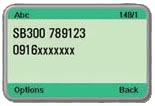
2. Retailer and Buyer get a confirmation message from LoadCentral.
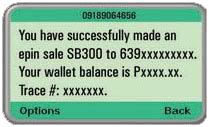
Message to Retailer:
You have succesfully made an e-pin sale (Product Code) to (Mobile number of buyer). Your wallet balance is Pxxxx.xx. Trace #: xxxxxxx
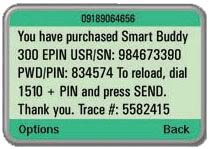
Message to Buyer:
You have purchased (Product Code) (PIN). Thank you for using our service. Trace #: xxxxxxx
Was this post helpful? Rate it! (25 votes, average: 4.52 out of 5)Loading...
How to Sell eLoad Products via LoadCentral Webtool
1. Go to the official LoadCentral webtool – http://loadcentral.net
2. Log in using correct username (63xxxxxxx) and SL password
3. Choose the product you want to sell from the Products dropdown list
4. Enter the buyer’s mobile number
5. Enter quantity being purchased
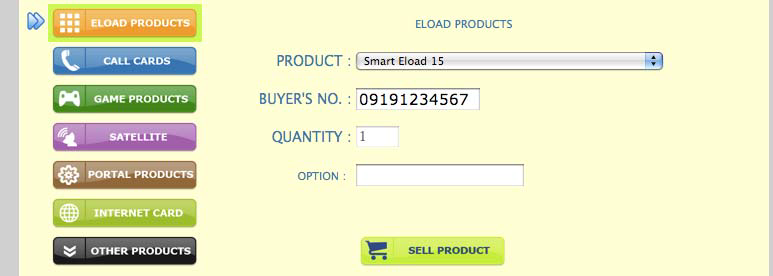
6. For Globe and Touch Mobile autoloadmax, please type the amount being purchased in the Optional Parameter textbox
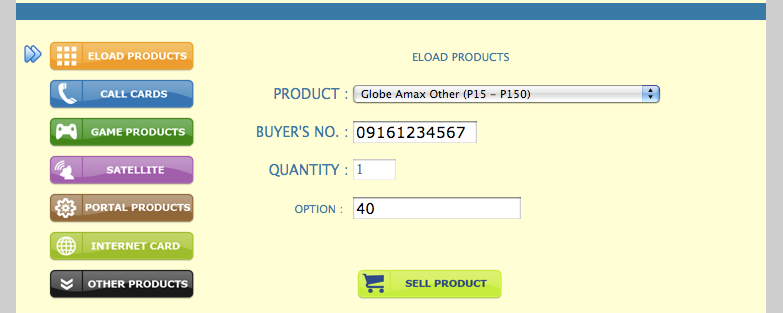
7. Click Sell Products button
*The result of your recent file transaction will be displayed on top portion of the page. The e-Pin sold will also be displayed on the “Your Recent Sale Transaction” box. Buyer receives a confirmation of item purchased from LoadCentral.
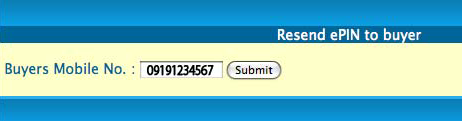
*There are times when an Epin sold is not sent to the customer’s mobile phone due to poor signal or some technical problems encountered at the time of purchase. We can let the system resend the last epin that was sold. This action does not deduct anything from the retailer’s wallet load since we are just resending the last epin that was already sold. Simply enter the customer’s mobile phone number and click on the “Submit” button to resend the customer’s last bought ePIN.
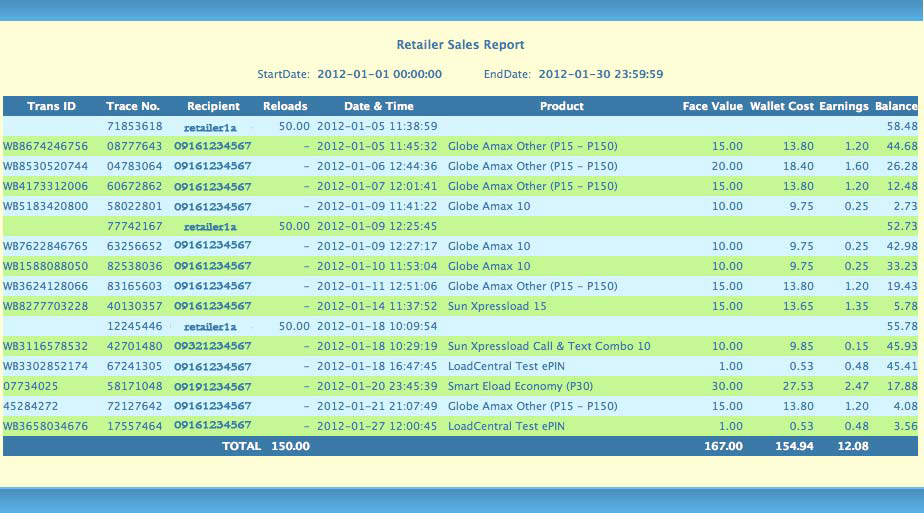
*Retailers can also generate a detailed report of their sales transactions and earnings within a certain date using the webtool. They can choose a start and end date to further filter out the report.
Advantages of using the Web Tool in selling products:
- No SMS cost since transaction is via web interface.
- Faster and more efficient since it by-passes LoadCentral’s access SMS numbers.
- The details of the e-PIN that was just sold are displayed on the PC monitor.
- A Retailer can generate a detailed report of his sales transactions and earnings.
- A retailer can do advance selling of e-PIN to himself for fast-movers.
- A retailer can sell a maximum of 10 e-PINs of the same product denomination per transaction.
- A retailer can opt to log in and sell eload from a static IP address only which offers security for the retailer.
- In the absence of a static IP address, the retailer can use the web lock feature of the system.
- In case the LoadCentral official website (www.loadcentral.com.ph) is not accessible, the retailer can directly access the URL by logging in at https://125.5.123.144
Was this post helpful? Rate it! (40 votes, average: 4.23 out of 5)Loading...